
Have you ever clicked on a website, waited forever for it to load, and just gone back to Google? Or searched for something online only to be met by results that look plain and uninformative? If you’re nodding along, you’re not alone – millions of users do this every day. As a business owner or designer, this is your wake-up call. The biggest mistake in website design isn’t skimping on pretty visuals (though that’s important too); it’s ignoring website speed SEO, and schema markup basics. Visuals make up only one-third of a killer site; the real game-changers are lightning-fast loading and smartly structured data that boosts your SEO rankings.
This article will discuss why these matter, compare site builder speeds, break down schema markup basics, and show you how to fix it all. By the end, you’ll feel confident about creating a site that is not only eye candy but also performs like a champ, helping drive web traffic and conversion rates.

Three Important Elements of a Website: Appearance, Schema, and Speed
Before going into best practices on web design, it is important to acknowledge that there are three distinct parts of a website. This list is not all inclusive, but it primarily covers the general categories that should be addressed.
Defining Website Appearance
Web appearance is not to be trifled with. Hundreds of hours of web designers and even more time in implementation can be put into how the site looks. In fact, a good question to ask is: what is the purpose of this site? If it is only to look professional, a simpler appearance might due. But, having the other two categories of schema and speed will not make up for bad appearance. In fact, one of the first websites I built I decided to skip out on appearance. It was for my current employer as an effort for an economical site but, to speak plainly, it looked hideous! No one cared that the schema and speed were right because it just didn’t look professional. Most users judge a business and their website in the first 5 seconds of looking at it.
Explaining Website Schema
Now, how did that person find your website in the first place? There is a chance that the potential client found it because you emailed or texted them a link, but this is unlikely. More likely, that person went to a search engine or google maps, typed in your name, and clicked on the site. Wouldn’t it be embarrassing if your website did not come up? Google has web crawlers and their own internal algorithms for ranking but Schemas are a straight forward way of saying to search engine’s: “This is who I am and this is what I do.” Some businesses who do not have a schema get ranked anyway but leaving something so essential up to chance is an absolute waste.
The Role of Website Speed
As mentioned, a slow website is extremely annoying and will result in a great number of bounces. But, the speed also results in a direct rank penalty if it fails to meet thresholds from engines. Google, for instance, has a few criteria including 2.5 seconds for the Largest Content Paint. Failing to meet this not only has a worse bounce rate and reranking but also a direct penalty in some cases.
The critical role of Website Speed in SEO and Design
Let’s start with the basics: why is website speed in SEO such a big deal? Imagine your ideal customer is all amped up to buy what you’re selling. They’re searching on Google and land on your page. But your page takes forever to load. Result? Poof, they’re gone. Studies show that even a one-second delay can slash conversion rates by 7%, and if it hits 3 seconds, bounce rates skyrocket to 53%!
For SEO, Google has made it crystal clear: speed is a ranking factor, especially since Core Web Vitals rolled out. Slow sites get buried in search results, while fast ones climb higher, driving more traffic. It’s all about user experience – happy visitors stick around, engage, and convert, which signals to search engines that your site deserves top spots.
How to measure and improve Website Speed for SEO?
PageSpeed Insights is a free tool by Google that analyzes your site’s performance on mobile and desktop, including mobile devices where mobile users expect quick loading speeds. It works by running lab tests (simulated environments) and pulling real-user field data from Chrome User Experience Reports.
You’ll get insights into key metrics like Largest Contentful Paint(LCP– aim for 2.5 seconds for the main content to appear) and First Contentful Paint(FCP–aim for under 1.8 seconds for initial load). If your site is lagging, here are some things you can do to optimize page load times:
- Compress your images to next-gen formats like WebP.
- Minify CSS and JavaScript to shrink file sizes.
- Enable browser cache for repeat visits.
- Enable lazy-loading offscreen elements so they don’t bog down the initial render.
These tweaks can save you seconds in page loading speed, saving you money on lost leads and boosting your rankings in return. Regular updates to these optimizations will help maintain low bounce rates.
Speed comparisons: Which site builders perform best?
Now, let’s talk site builder speeds–because not all platforms are created equal. If you’re relying on a drag-and-drop builder, its inherent performance can make or break your site, especially for responsive design and mobile devices.
Based on 2025 tests focusing on Core Web Vitals pass rates, here’s a comparison of the most popular builders. Higher percentages mean better performances, with global averages at 53% for desktop and 41% for mobile.
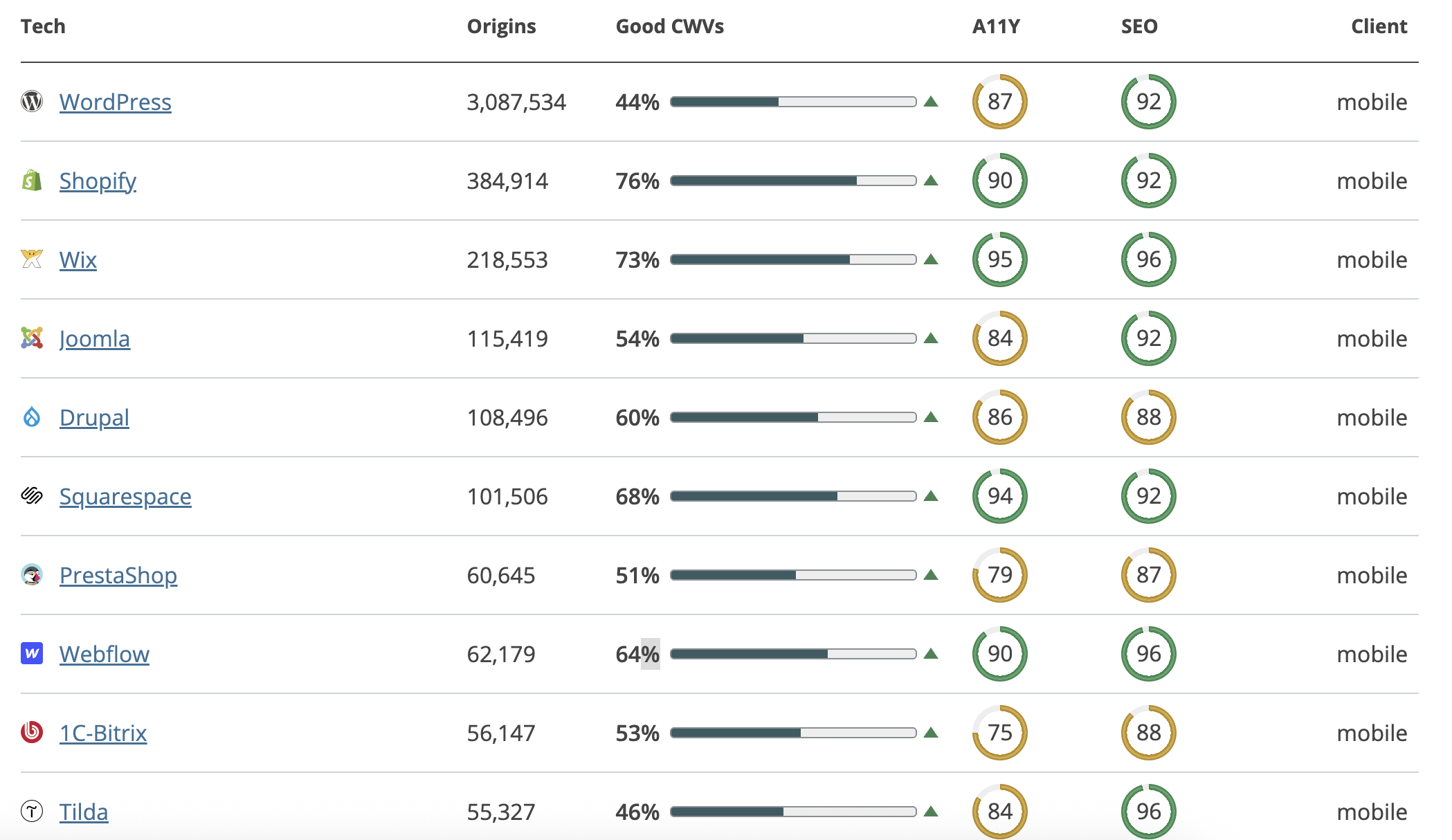
Based on speed alone, Shopify Wix, Webflow, and Squarespace seem to be the best. But, this does not take into account any other factors such as cost, ease of use, integrations, bugs, or SEO friendliness!
That being said, the key here is how the builders are utilized and what themes are chosen. Choosing the wrong theme can be absolutely destructive as some are so heavy that it is almost completely impossible while some lightweight themes almost always pass with optimizations like a Content Delivery Network (CDN).
Comparing a few of the web template technologies directly from really shows the variance allotted:
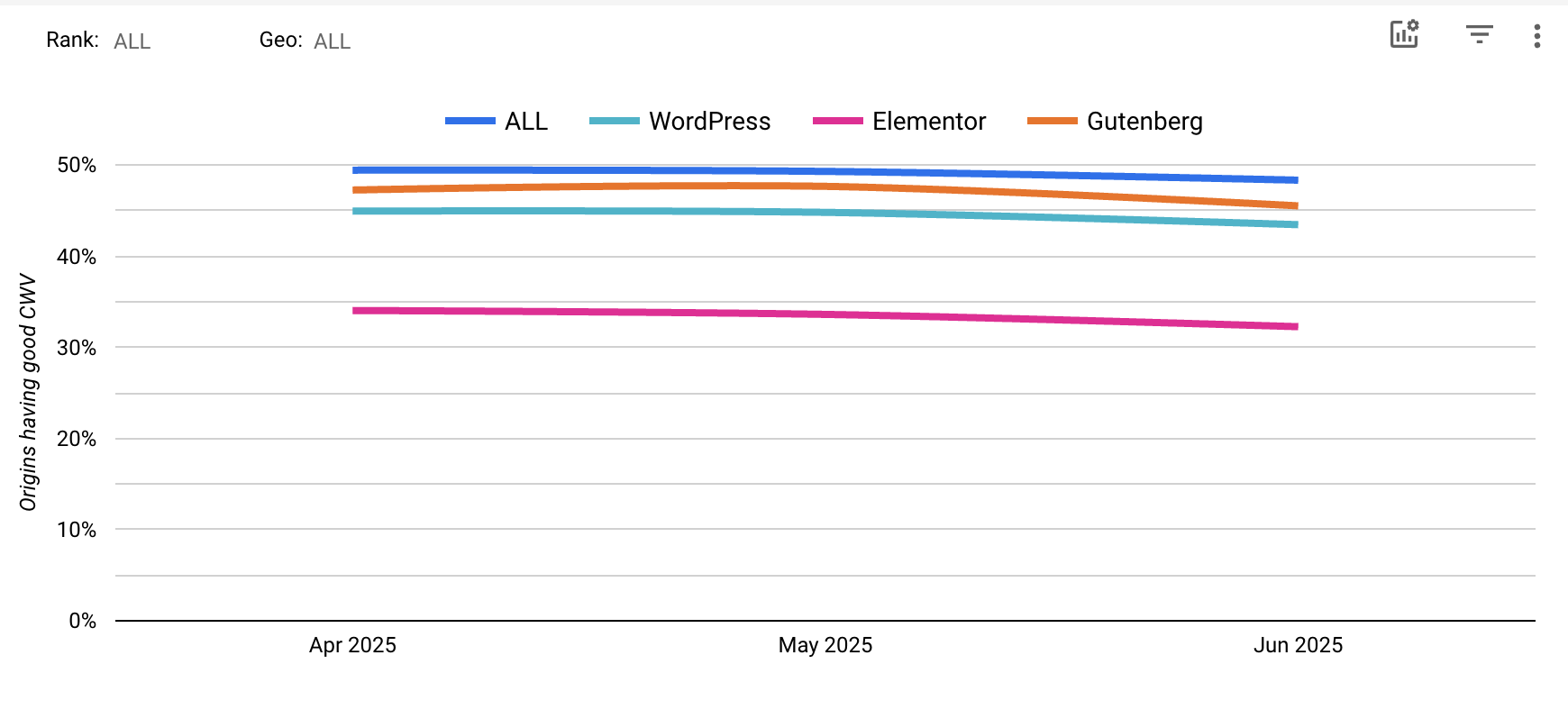
Always test your built site with PageSpeed Insights to catch builder-specific issues early. Choosing a fast foundation means less hassle later and better website speed SEO right out the gate. This helps avoid common website design mistakes like poor loading speeds.
Schema markup basics: Unlocking better search visibility
Moving on, let’s talk about Schema markup–one of the most unsung heroes of SEO. Schema markup is basically code (structured data) you add to your HTML code to help search engines understand your content better.
Think of it as labeling your site’s elements: instead of just seeing “Avatar” as text, Google now knows its a movie with a director and a genre. The basics come from Schema.org, where you pick types like “Organization” for your business details or “Product” for eCommerce items. The easiest way? Use JSON-LD format. It’s a script tag in your head or body tht doesn’t mess with your visible content.
But why bother with a schema for SEO? It’s the simplest way to enable rich snippets. Rich snippets are those eye-catching results with stars, prices, or FAQs. They’ve been proven to boost clickthrough rates by up to 43%!
While it may not be a direct ranking boost, it clarifies your content, helps with voice searches(where quick answers win), and builds a knowledge graph for better relevance. For instance, adding review schema can display star ratings in results. This brings in more clicks and indirectly improves rankings through higher engagements, making it one of the critical design mistakes to avoid.
How to implement a Schema Markup for better results?
Implementing schema markup is simpler than it sounds. Let’s break it down into clear, step-by-step instructions using Schema.org as your guide. This way, you’ll easily add structured data and validate it for top-notch SEO results.
- Choose your Schema type.
Visit Schema.org and pick the type that fits your page. If you’re a local business, simply select the “LocalBusiness” option for a shop or the “Product” for items. You can browse their full list; they have a schema for everything.
- Generate the code
Once you’ve picked your type, it’s time to create the code. The easiest and most modern option is JSON-LD. If you’re marking up a local business, it might look like this:
{
"@context": "https://schema.org",
"@type": "LocalBusiness",
"name": "Your Biz Tyler",
"url": "https://yourbiz.com",
"address": {
"@type": "PostalAddress",
"streetAddress": "123 Main St",
"addressLocality": "Tyler",
"addressRegion": "TX",
"postalCode": "75701",
"addressCountry": "US"
},
"telephone": "+1-903-555-1234",
"logo": "https://yourbiz.com/logo.png",
"openingHours": "Mo-Fr 09:00-17:00",
"priceRange": "$$"
}
Or if you have a product, then its schema might look like this:
{
"@context": "https://schema.org",
"@type": "Product",
"name": "Kenmore White 17\" Microwave",
"description": "0.7 cubic feet countertop microwave. Has six preset cooking categories and convenience features like Add-A-Minute and Child Lock.",
"image": "https://example.com/kenmore-microwave-17in.jpg",
"offers": {
"@type": "Offer",
"availability": "https://schema.org/InStock",
"price": "55.00",
"priceCurrency": "USD"
},
"aggregateRating": {
"@type": "AggregateRating",
"ratingValue": "3.5",
"reviewCount": "11"
}
}
You can customize it with your details like name, URL, description, etc.
On the other hand, if you want a point-and-click generator, then Google’s Structured Data Markup Generator can be an excellent, hassle-free choice.
- Add the Markup to your website.
Now it’s time to integrate the code into your site. You can go into its code and paste the JSON-LD in the HTML header for the page you’re adding the schema to.
If you’re on some drag-and-drop builder like WordPress, you can easily add the code with plugins like Yoast or Rankmath that have built in tools for adding schema so you don’t have to indulge in code-editing yourself.
- Validate your Schema
This is important to ensure everything is working properly. Go to search.google.com/test/rich-results. Enter your page’s URL, hit “Test” and wait for analysis. This free tool ensures your markup qualifies for enhanced search results.
- Review the results and fix any issues.
If valid, you’ll see enhanced outputs, like a Product schema preview showing prices and stock. Now your listing is ready to pop in search results!
Combining Website Speed and Schema Markup for optimal SEO results
The real magic happens when you combine speed and schema markups. A fast site with schema is unstoppable. Structured data pulls them from results, and quick loads keep them hooked. For example, an eCommerce site on Shopify could optimize images for speed(hitting high CWV scores) and add Product schema for rich results, skyrocketing traffic. Small changes like these can yield big wins, saving time and money while outpacing competitors.
Takeaway
Wrapping up, remember: don’t let ignoring website speed and schema markup tank your site’s potential. Prioritize these for a user-friendly, SEO-optimized powerhouse with a responsive design. Right now you might just want a “Digital Resume” but building a website on the wrong foundations will create tons of problems later on when you are wanting to scale and investment more intensely in paid ads or Search Engine Optimization. Ready to revamp your website? Contact us today for expert help and we’ll build a fast, schema savvy site that drives real results!